Native integration with Copper CRM can be a huge time-saver to automate repetitive tasks. We have outlined the steps below to integrate with Copper CRM using their REST API below. Following these steps should save you immense time that would have otherwise been spent on unnecessary research and navigation.
Signup for Copper CRM
To start, sign up for Copper CRM by creating an account. Copper provides a free trial signup, so you can get started right away.
Get your API Key
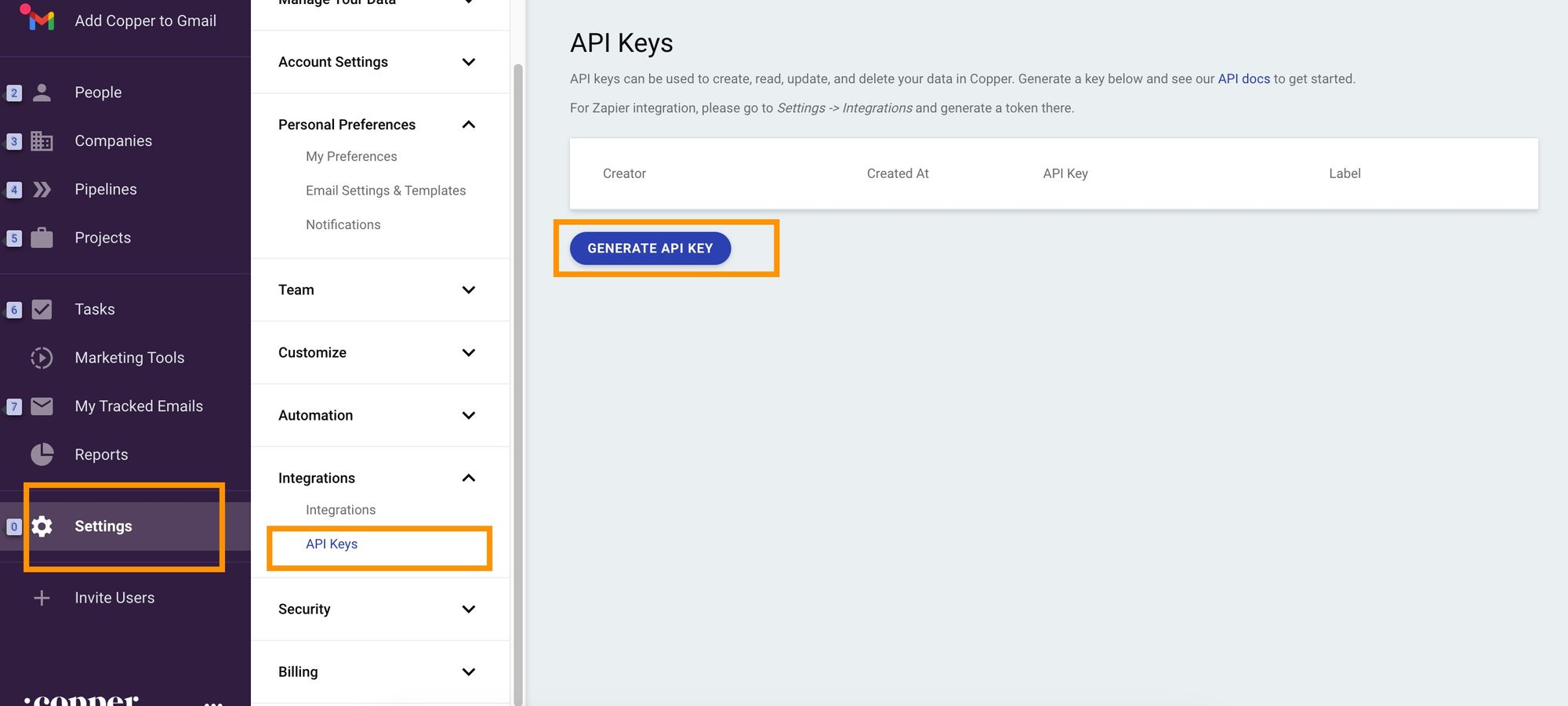
Copper uses API key-based authentication, so you need to generate an API key to start making requests. To generate an API Key, go to the Settings tab on the sidebar and click Integrations, then API Keys. Click Generate API Key and Copper will provide you with a new API Key.

Generating a Copper CRM API Key
Make your First API Call
Before making your first API call, there are a few important things to keep in mind.
API URL
Copper's API can be found at https://api.copper.com/developer_api/
HTTPS
Copper uses HTTPS for their API. Make sure to use HTTPS for all requests.
Headers
Include the following headers in your requests:
X-PW-AccessToken: <Your API Key> X-PW-Application: developer_api X-PW-UserEmail: <Email address of the token owner> Content-Type: application/json
Required headers for Copper CRM API
More info here.
Rate Limits
Copper limits API calls to 180 requests per minute. After reaching this limit, Copper returns a status code of 429.
Pagination
Copper uses page number-based pagination for their /search endpoints, which are mainly POST calls. You can sort results using sort_by and sort_direction. You need to provide the page_size and page_number in the request body.
More info here.
Code example
The following code example shows a typical request to the Copper API.
import requests url = 'https://api.copper.com/developer_api/v1/search' headers = { 'X-PW-AccessToken': '<Your API Key>', 'X-PW-Application': 'developer_api', 'X-PW-UserEmail': '<Email address of the token owner>', 'Content-Type': 'application/json' } payload = { "page_number": 1, "page_size": 50, "sort_by": "name", "sort_direction": "asc" } response = requests.post(url, headers=headers, json=payload)
Following these steps will you put on the right path to integrating Copper CRM.
Are you looking to natively integrate with all leading CRMs such as HubSpot, Close, Pipedrive, Freshsales, and Microsoft Dynamics 365? Use Truto.one for free. It’s built for developers by developers to natively integrate all CRMs in one go.
If you have any questions or run into a roadblock, feel free to reach out to us at support@truto.one, we’ll be happy to help.
Native integration with Copper CRM can be a huge time-saver to automate repetitive tasks. We have outlined the steps below to integrate with Copper CRM using their REST API below. Following these steps should save you immense time that would have otherwise been spent on unnecessary research and navigation.
Signup for Copper CRM
To start, sign up for Copper CRM by creating an account. Copper provides a free trial signup, so you can get started right away.
Get your API Key
Copper uses API key-based authentication, so you need to generate an API key to start making requests. To generate an API Key, go to the Settings tab on the sidebar and click Integrations, then API Keys. Click Generate API Key and Copper will provide you with a new API Key.

Generating a Copper CRM API Key
Make your First API Call
Before making your first API call, there are a few important things to keep in mind.
API URL
Copper's API can be found at https://api.copper.com/developer_api/
HTTPS
Copper uses HTTPS for their API. Make sure to use HTTPS for all requests.
Headers
Include the following headers in your requests:
X-PW-AccessToken: <Your API Key> X-PW-Application: developer_api X-PW-UserEmail: <Email address of the token owner> Content-Type: application/json
Required headers for Copper CRM API
More info here.
Rate Limits
Copper limits API calls to 180 requests per minute. After reaching this limit, Copper returns a status code of 429.
Pagination
Copper uses page number-based pagination for their /search endpoints, which are mainly POST calls. You can sort results using sort_by and sort_direction. You need to provide the page_size and page_number in the request body.
More info here.
Code example
The following code example shows a typical request to the Copper API.
import requests url = 'https://api.copper.com/developer_api/v1/search' headers = { 'X-PW-AccessToken': '<Your API Key>', 'X-PW-Application': 'developer_api', 'X-PW-UserEmail': '<Email address of the token owner>', 'Content-Type': 'application/json' } payload = { "page_number": 1, "page_size": 50, "sort_by": "name", "sort_direction": "asc" } response = requests.post(url, headers=headers, json=payload)
Following these steps will you put on the right path to integrating Copper CRM.
Are you looking to natively integrate with all leading CRMs such as HubSpot, Close, Pipedrive, Freshsales, and Microsoft Dynamics 365? Use Truto.one for free. It’s built for developers by developers to natively integrate all CRMs in one go.
If you have any questions or run into a roadblock, feel free to reach out to us at support@truto.one, we’ll be happy to help.
Native integration with Copper CRM can be a huge time-saver to automate repetitive tasks. We have outlined the steps below to integrate with Copper CRM using their REST API below. Following these steps should save you immense time that would have otherwise been spent on unnecessary research and navigation.
Signup for Copper CRM
To start, sign up for Copper CRM by creating an account. Copper provides a free trial signup, so you can get started right away.
Get your API Key
Copper uses API key-based authentication, so you need to generate an API key to start making requests. To generate an API Key, go to the Settings tab on the sidebar and click Integrations, then API Keys. Click Generate API Key and Copper will provide you with a new API Key.

Generating a Copper CRM API Key
Make your First API Call
Before making your first API call, there are a few important things to keep in mind.
API URL
Copper's API can be found at https://api.copper.com/developer_api/
HTTPS
Copper uses HTTPS for their API. Make sure to use HTTPS for all requests.
Headers
Include the following headers in your requests:
X-PW-AccessToken: <Your API Key> X-PW-Application: developer_api X-PW-UserEmail: <Email address of the token owner> Content-Type: application/json
Required headers for Copper CRM API
More info here.
Rate Limits
Copper limits API calls to 180 requests per minute. After reaching this limit, Copper returns a status code of 429.
Pagination
Copper uses page number-based pagination for their /search endpoints, which are mainly POST calls. You can sort results using sort_by and sort_direction. You need to provide the page_size and page_number in the request body.
More info here.
Code example
The following code example shows a typical request to the Copper API.
import requests url = 'https://api.copper.com/developer_api/v1/search' headers = { 'X-PW-AccessToken': '<Your API Key>', 'X-PW-Application': 'developer_api', 'X-PW-UserEmail': '<Email address of the token owner>', 'Content-Type': 'application/json' } payload = { "page_number": 1, "page_size": 50, "sort_by": "name", "sort_direction": "asc" } response = requests.post(url, headers=headers, json=payload)
Following these steps will you put on the right path to integrating Copper CRM.
Are you looking to natively integrate with all leading CRMs such as HubSpot, Close, Pipedrive, Freshsales, and Microsoft Dynamics 365? Use Truto.one for free. It’s built for developers by developers to natively integrate all CRMs in one go.
If you have any questions or run into a roadblock, feel free to reach out to us at support@truto.one, we’ll be happy to help.
Native integration with Copper CRM can be a huge time-saver to automate repetitive tasks. We have outlined the steps below to integrate with Copper CRM using their REST API below. Following these steps should save you immense time that would have otherwise been spent on unnecessary research and navigation.
Signup for Copper CRM
To start, sign up for Copper CRM by creating an account. Copper provides a free trial signup, so you can get started right away.
Get your API Key
Copper uses API key-based authentication, so you need to generate an API key to start making requests. To generate an API Key, go to the Settings tab on the sidebar and click Integrations, then API Keys. Click Generate API Key and Copper will provide you with a new API Key.

Generating a Copper CRM API Key
Make your First API Call
Before making your first API call, there are a few important things to keep in mind.
API URL
Copper's API can be found at https://api.copper.com/developer_api/
HTTPS
Copper uses HTTPS for their API. Make sure to use HTTPS for all requests.
Headers
Include the following headers in your requests:
X-PW-AccessToken: <Your API Key> X-PW-Application: developer_api X-PW-UserEmail: <Email address of the token owner> Content-Type: application/json
Required headers for Copper CRM API
More info here.
Rate Limits
Copper limits API calls to 180 requests per minute. After reaching this limit, Copper returns a status code of 429.
Pagination
Copper uses page number-based pagination for their /search endpoints, which are mainly POST calls. You can sort results using sort_by and sort_direction. You need to provide the page_size and page_number in the request body.
More info here.
Code example
The following code example shows a typical request to the Copper API.
import requests url = 'https://api.copper.com/developer_api/v1/search' headers = { 'X-PW-AccessToken': '<Your API Key>', 'X-PW-Application': 'developer_api', 'X-PW-UserEmail': '<Email address of the token owner>', 'Content-Type': 'application/json' } payload = { "page_number": 1, "page_size": 50, "sort_by": "name", "sort_direction": "asc" } response = requests.post(url, headers=headers, json=payload)
Following these steps will you put on the right path to integrating Copper CRM.
Are you looking to natively integrate with all leading CRMs such as HubSpot, Close, Pipedrive, Freshsales, and Microsoft Dynamics 365? Use Truto.one for free. It’s built for developers by developers to natively integrate all CRMs in one go.
If you have any questions or run into a roadblock, feel free to reach out to us at support@truto.one, we’ll be happy to help.
In this article
Content Title
Content Title
Content Title
ON THIS PAGE
3 steps to integrate with Copper CRM using REST API
More from our Blog
Product Updates
Introducing QueryBird: A simple, secure way to access your most valuable data
QueryBird is a secure, VPC-native scheduler that moves data from internal databases to external webhooks. Automate your data pipelines with a simple YAML configuration.

Product Updates
Introducing QueryBird: A simple, secure way to access your most valuable data
QueryBird is a secure, VPC-native scheduler that moves data from internal databases to external webhooks. Automate your data pipelines with a simple YAML configuration.

Product Updates
Introducing QueryBird: A simple, secure way to access your most valuable data
QueryBird is a secure, VPC-native scheduler that moves data from internal databases to external webhooks. Automate your data pipelines with a simple YAML configuration.

Educational
Understanding MCP Server Security Risks and Ways to Mitigate Them
A comprehensive guide to MCP security: understand key threats, examples, and effective strategies to secure your AI integrations.

Educational
Understanding MCP Server Security Risks and Ways to Mitigate Them
A comprehensive guide to MCP security: understand key threats, examples, and effective strategies to secure your AI integrations.

Educational
Understanding MCP Server Security Risks and Ways to Mitigate Them
A comprehensive guide to MCP security: understand key threats, examples, and effective strategies to secure your AI integrations.

Educational
What is MCP and MCP servers and How do they work
MCP, or Model Context Protocol, gives AI assistants a standard way to use external apps and data safely. This guide explains how hosts, servers, and tools interact, how JSON validation and structured results keep calls reliable, and why Unified APIs make integrations faster and easier to manage.

Educational
What is MCP and MCP servers and How do they work
MCP, or Model Context Protocol, gives AI assistants a standard way to use external apps and data safely. This guide explains how hosts, servers, and tools interact, how JSON validation and structured results keep calls reliable, and why Unified APIs make integrations faster and easier to manage.

Educational
What is MCP and MCP servers and How do they work
MCP, or Model Context Protocol, gives AI assistants a standard way to use external apps and data safely. This guide explains how hosts, servers, and tools interact, how JSON validation and structured results keep calls reliable, and why Unified APIs make integrations faster and easier to manage.

Take back focus where it matters. Let Truto do integrations.
Learn more about our unified API service and solutions. This is a short, crisp 30-minute call with folks who understand the problem of alternatives.
Take back focus where it matters. Let Truto do integrations.
Learn more about our unified API service and solutions. This is a short, crisp 30-minute call with folks who understand the problem of alternatives.
Take back focus where it matters. Let Truto do integrations.
Learn more about our unified API service and solutions. This is a short, crisp 30-minute call with folks who understand the problem of alternatives.
Developers
Developers
Developers
Accounting
ATS
Application Development
Business Intelligence
Conversational Intelligence
Default
Helpdesk
HRIS
Event Management
Marketing Automation
Remote Support
Ticketing
Did our integrations roster hit the spot?
© Yin Yang, Inc. 2024. All rights reserved.
9450 SW Gemini Dr, PMB 69868, Beaverton, Oregon 97008-7105, United States
Accounting
ATS
Application Development
Business Intelligence
Conversational Intelligence
Default
Event Management
Helpdesk
HRIS
Marketing Automation
Remote Support
Ticketing
Did our integrations roster hit the spot?
© Yin Yang, Inc. 2024. All rights reserved.
9450 SW Gemini Dr, PMB 69868, Beaverton, Oregon 97008-7105, United States
Accounting
ATS
Application Development
Business Intelligence
Conversational Intelligence
Default
Helpdesk
HRIS
Event Management
Marketing Automation
Remote Support
Ticketing
Did our integrations roster hit the spot?
© Yin Yang, Inc. 2024. All rights reserved.
9450 SW Gemini Dr, PMB 69868, Beaverton, Oregon 97008-7105, United States